

Shop Smarter with BrandBee: Coupons, Discounts, and Automatic Savings in One Place


Online shopping is easy. Chasing an actual discount rarely is.
You know the routine. You are ready to buy, open a new tab, and start searching for a promo code. What comes back is a mess. Some links lead to cluttered coupon sites. Others look legit until you paste the code at checkout and hit the same wall again. Invalid. Expired. Not eligible. Repeat.
That cycle adds friction fast. It is even worse on mobile, where jumping between tabs, copying text, and reloading pages feels like work instead of shopping. What should take seconds can stretch into minutes, and sometimes longer.
Plenty of shoppers feel it. One consumer survey found that nearly three in ten shoppers get annoyed when a promo code fails at checkout. Separate research from CouponFollow shows how common it is for people to search for codes before completing a purchase.
BrandBee’s answer to this is simple: put savings where shopping already happens. The new Save tab brings coupons directly into the app, which offers both manual control and hands-free help without the usual runaround.
What’s new in the BrandBee Save tab?
BrandBee has expanded the Save tab with a built-in shopping feature that brings coupon codes and on-site discounts directly into your browsing flow.
Instead of jumping between tabs or testing sketchy promo codes from unfamiliar sites, the Save tab now works as a central place for discounts. While shopping online, users can:
- Find available coupons from hundreds of retailers
- Apply valid discounts during checkout
- Turn on automatic coupon checks as they browse
The coverage spans the stores people already shop from with Brandee. This includes major marketplaces like Amazon and AliExpress, well-known fashion brands such as Adidas, and a diverse range of retailers across various categories, including tech, beauty, home, sports, and lifestyle.
Two simple ways to save with BrandBee
BrandBee offers two clear routes to savings. One is manual and visible from start to finish. The other runs quietly in the background and shows up right when you are about to pay. Both are built for different shopping habits, and neither changes how you normally shop.
Option 1: Discount wall (manual savings, full control)
Best for: Shoppers who like to browse deals, plan purchases ahead of time, and choose the exact coupon they want to use.
How it works (step by step):
1. Open the Save tab inside the BrandBee app
2. Browse a large list of available coupons from well-known retailers
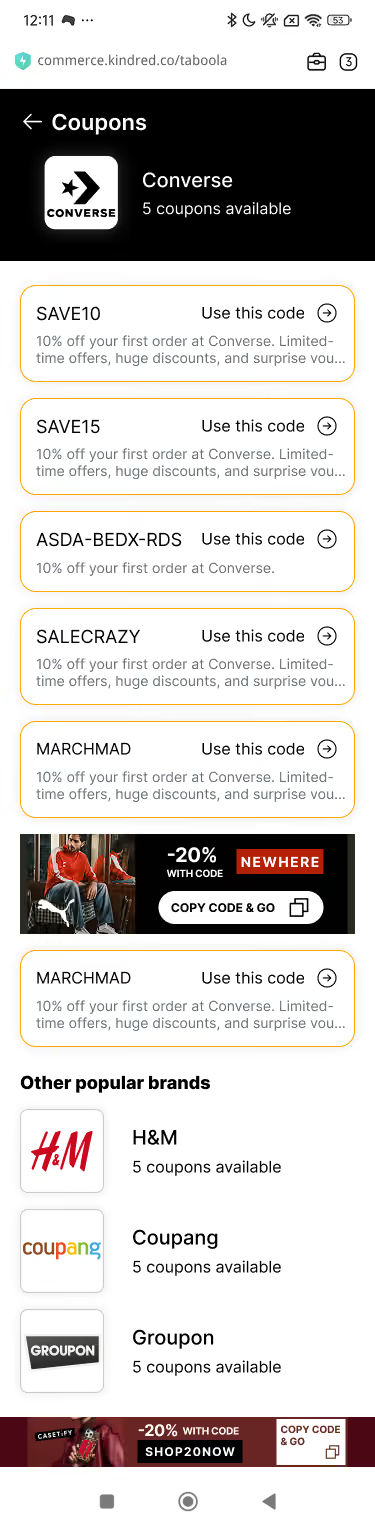
3. Copy the coupon code you want
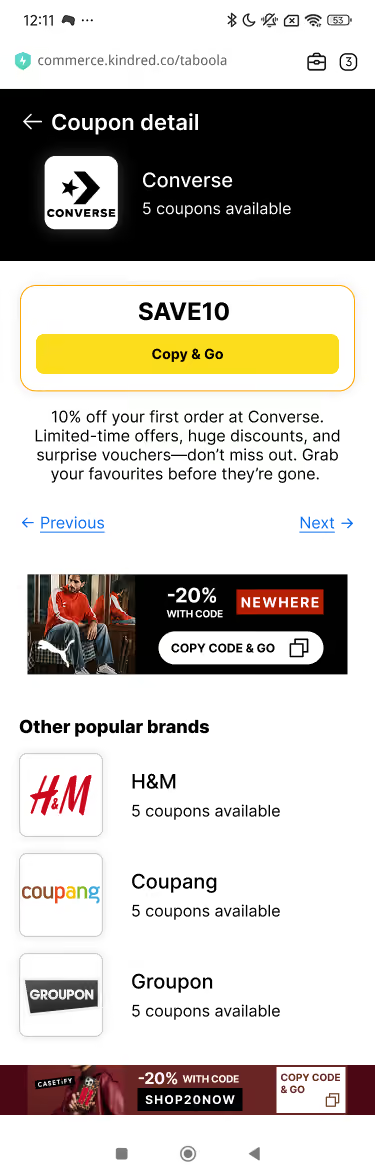
4. Paste it at checkout and see the discount apply
Benefits that matter:
- Works on any device. The Discounts Wall runs inside the app and does not need extra permissions.
- No browser permissions required. If you prefer to keep everything manual, this option stays that way.
- You see the deal before using it. There is no trial and error since you choose the code first.
- Good for planners and deal hunters. If you already know you want to shop at Nike, Converse, H&M, or similar stores, you can check available offers before deciding to buy.
This option also works well for shoppers who want a quiet experience. There are no pop-ups while browsing. You decide when to open the app and look for savings, not the other way around.
Option 2: Automatic savings (hands-free discounts)
Best for: Shoppers who want discounts applied automatically, especially during quick or last-minute checkouts.
How it works (step by step):
1. Enable the browser permission for BrandBee Automatic Savings
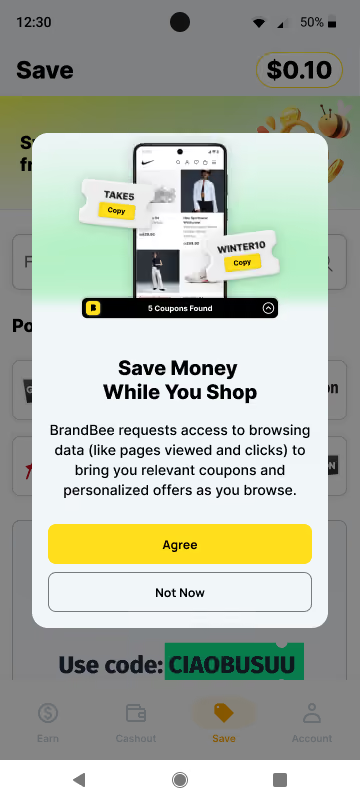
2. Shop as usual at your favorite stores
3. BrandBee looks for matching coupon codes in the background

4. A pop-up appears with the best available code
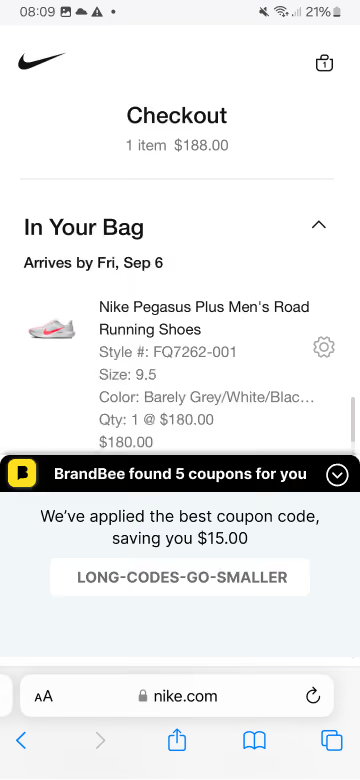
5. Apply it with one tap
Benefits that matter:
- No searching, copying, or testing codes. The goal is fewer steps right before you buy.
- Savings appear at the right moment. The prompt shows up during checkout instead of sending you off to search elsewhere.
- Useful for fast checkouts and impulse purchases. When buying something quickly on mobile, this removes extra steps.
If permissions are a concern, the Accessibility Permission is used only to recognize which store you are visiting so it can look for relevant coupons. BrandBee does not read payment details or access anything beyond coupon detection.
Automatic Savings is available on Android mobile devices and works across common browsers like Chrome, Edge, Firefox, Opera, Brave, and DuckDuckGo, as long as they are updated to recent versions.
Why is this better than traditional coupon sites
Most coupon hunting follows the same loop. You search for a code, paste it at checkout, watch it fail, then repeat the process with another tab open. The frustration usually comes down to three issues: low confidence in the code, too many steps, and offers that appear at the wrong moment.
BrandBee’s new feature takes a different route. It improves the experience without pulling shoppers through endless coupon pages or forcing them to manage a separate workflow:
- Fewer expired or misleading codes. Rather than serving long lists of coupons that may or may not apply, BrandBee’s in-app tools prioritize active offers and check eligibility while you shop, not after the fact.
- No cluttered coupon pages. Traditional coupon sites rely on ads, pop-ups, and distractions to keep you scrolling. With BrandBee, the process stays inside a single app flow, without detours.
- No guessing which coupon works. Automatic Savings surfaces the best available code at the right moment, removing the need to test multiple options.
- Better timing at checkout. Failed promo codes often appear late in the process and break momentum. The Save tab is built to reduce that friction before it happens.
- One place you already trust. If you already use BrandBee for rewards, there is no new habit to learn and no extra app to juggle.
How does this fit into the bigger BrandBee experience
BrandBee has always been pitched as more than a single lane rewards app. Surveys, games, receipt scanning, and flexible cash or gift card payouts already give users multiple ways to earn without changing how they shop.
This new feature adds another piece to that picture. Coupons and on-site discounts now sit alongside earning tools, creating a full loop around checkout behavior. You can reduce what you pay upfront, then continue earning value after the purchase.
That makes the experience simple to understand. Spend less at the register. Earn more through everyday actions. Stack both over time instead of choosing one or the other.
There is also proof behind the promise. BrandBee paid out more than $4 million in 2024, and over 500,000 people are already earning through the app. This update fits naturally into an ecosystem that users already trust.
Getting started: How to use the Save tab today
You do not need a setup guide or a long onboarding flow. Getting started takes less than a minute:
- Download or open the BrandBee app.
- Head straight to the Save Tab from the main navigation. You can also find step-by-step guidance in the BrandBee Help Center.
- Pick how you want to save:
- Open the Discounts Wall to browse available coupons and copy the code you want to use.
- Or switch on Automatic Savings to let BrandBee check coupons for you while you browse.
- Shop as usual and apply your savings at checkout.
Tip: If you turn on Automatic Savings and later decide you want fewer prompts, you can turn it off anytime. BrandBee walks you through this in the Coupon Finder toggle settings, so you stay in control.
Smarter shopping starts with BrandBee
Online savings should not feel like a scavenger hunt. No juggling tabs. No testing five codes. No restarting checkout from scratch.
The Save tab puts everything in one place that you already use for rewards. You get two clear paths. The Discounts Wall works for shoppers who like to browse and choose. Automatic Savings works for shoppers who want the quickest route from cart to confirmation, with the best available code surfaced at the right moment.
Download BrandBee today and make each online purchase simpler and more affordable.


